Viewing repository status
Now that you have added a few files to your local repository, how do you observe what changes have been made from the perspective of Git?
git status
The changes made to a repository can be generally viewed through the git status command.
According to the official documentation, git status
Displays paths that have differences between the index file and the current HEAD commit, paths that have differences between the working tree and the index file, and paths in the working tree that are not tracked by Git
That’s a lot of technical jargon. We will unpack it slowly in subsequent lessons, but a more palatable explanation to think of at the moment is that git status compares the latest changes of your local repository against the most recent “snapshot” (saved instance) of your repository.
We will be discussing snapshots in the next lesson!
Let’s try running git status on the hands-on repository we’ve created previously!
Run the following command:
git statusYou will should see something similar:
On branch main
No commits yet
Untracked files:
(use "git add <file>..." to include in what will be committed)
filea.txt
hello_world.txt
new_file.txt
script.py
nothing added to commit but untracked files present (use "git add" to track)The most important thing to note is that you should see the files you added from the previous hands-on listed under “Untracked files”.
Anatomy of git status
Let’s break down the text you get when you run git status:
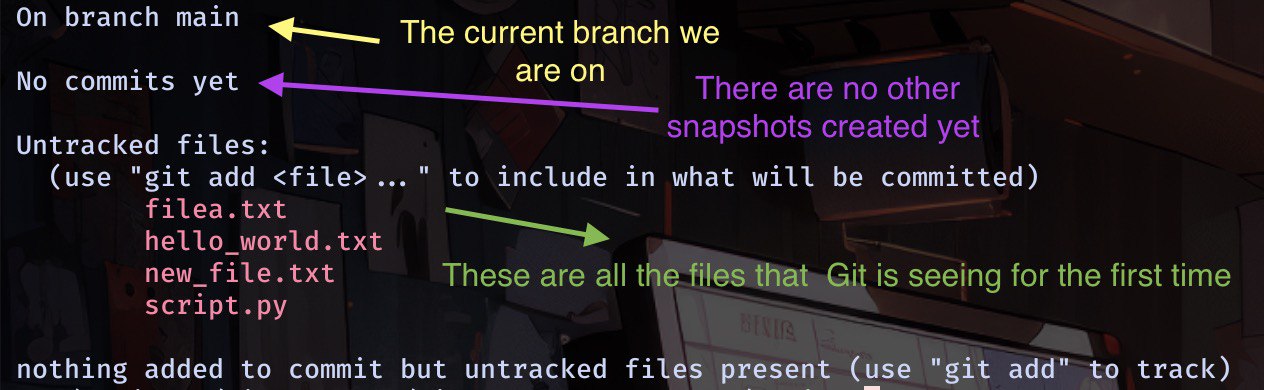
Files that are “untracked” are simply files that Git has never seen before in the local repository (i.e. it has no history where the file has existed), so it treats it as an untracked file.
This is the most basic form of git status that you will see because we have no other changes made to the local repository. As we explore using Git in local repositories, we will discuss other parts of git status.
Practice problem sets
| Problem set | Download |
|---|---|
| nothing-to-hide | bash download.sh nothing-to-hide |
| amateur-detective | bash download.sh amateur-detective |
For more problem sets, visit the problems directory