Exercises Directory
To download the exercise:
- i.Navigate inside the
gitmastery-exercisesfolder. - ii.Run the
gitmastery download under-controlcommand.
Scenario:
Your task:
When you download a Git-Mastery exercise, the output will tell you which directory to cd into to start the exercise:
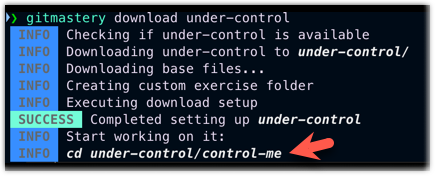
Initialize the control-me folder as a repository. Be careful not to initialize the parent folder under-control as a repo by mistake.
To verify your work:
- i.Navigate anywhere inside the
gitmastery-exercises/under-controlfolder (or any subfolder of it). - ii.Run the
gitmastery verifycommand.
To reset the exercise and start over, navigate to the gitmastery-exercises/under-control folder and run the gitmastery progress reset command.
To download the exercise:
- i.Navigate inside the
gitmastery-exercisesfolder. - ii.Run the
gitmastery download undo-initcommand.
Scenario:
You initialized a Git repository in the my-notes folder by mistake.
Your task:
Undo the repo initialization, without deleting any of the original files that were in that folder.
To verify your work:
- i.Navigate anywhere inside the
gitmastery-exercises/undo-initfolder (or any subfolder of it). - ii.Run the
gitmastery verifycommand.
To reset the exercise and start over, navigate to the gitmastery-exercises/undo-init folder and run the gitmastery progress reset command.
To download the exercise:
- i.Navigate inside the
gitmastery-exercisesfolder. - ii.Run the
gitmastery download stage-frightcommand.
Scenario:
The attendance repo has five files, two of which have been staged, and three are yet to be staged.
Your task:
Stage the three unstaged files.
To verify your work:
- i.Navigate anywhere inside the
gitmastery-exercises/stage-frightfolder (or any subfolder of it). - ii.Run the
gitmastery verifycommand.
To reset the exercise and start over, navigate to the gitmastery-exercises/stage-fright folder and run the gitmastery progress reset command.
To download the exercise:
- i.Navigate inside the
gitmastery-exercisesfolder. - ii.Run the
gitmastery download staging-interventioncommand.
Scenario:
Your task:
In the given intervention repo, unstage the following files: adam.txt, josh.txt, mary.txt.
Keep other files staged.
To verify your work:
- i.Navigate anywhere inside the
gitmastery-exercises/staging-interventionfolder (or any subfolder of it). - ii.Run the
gitmastery verifycommand.
To reset the exercise and start over, navigate to the gitmastery-exercises/staging-intervention folder and run the gitmastery progress reset command.
To download the exercise:
- i.Navigate inside the
gitmastery-exercisesfolder. - ii.Run the
gitmastery download grocery-shoppingcommand.
Scenario:
Your task:
The given shopping-list repo contains a shopping-list.txt file.
- Edit it (using any text editor) to remove at least one item from the shopping list and add at least one new item to the shopping list.
- Stage the change and commit it.
To verify your work:
- i.Navigate anywhere inside the
gitmastery-exercises/grocery-shoppingfolder (or any subfolder of it). - ii.Run the
gitmastery verifycommand.
To reset the exercise and start over, navigate to the gitmastery-exercises/grocery-shopping folder and run the gitmastery progress reset command.
To download the exercise:
- i.Navigate inside the
gitmastery-exercisesfolder. - ii.Run the
gitmastery download log-and-ordercommand.
Scenario:
You are given a repo named crime-spree (apparently, containing details of some crimes).
Your task:
- Open the
log-and-order/answers.txtfile to find the questions you need to answer. - Examine the list of commits in the
crime-spreerepo to find the answers. - Enter your answers in the
answers.txtfile.
Hint: The output of the git log is paginated. The commit you are looking for might not be in the first page of output it shows.
To verify your work:
- i.Navigate anywhere inside the
gitmastery-exercises/log-and-orderfolder (or any subfolder of it). - ii.Run the
gitmastery verifycommand.
To reset the exercise and start over, navigate to the gitmastery-exercises/log-and-order folder and run the gitmastery progress reset command.
To download the exercise:
- i.Navigate inside the
gitmastery-exercisesfolder. - ii.Run the
gitmastery download remote-controlcommand.
Scenario:
Your task:
- As usual,
cdinto theremote-controlfolder. - Run the
gitmastery verifycommand. - Take note of the repo name provided by the Git-Mastery app (in its response).
- Create a new public GitHub repository using the repo name given.
- Provide the URL of that remote (without the
.gitat the end) when prompted.
For example,https://github.com/[[username: JohnDoe]]/gitmastery-[[username: JohnDoe]]-remote-control
To verify your work:
- i.Navigate anywhere inside the
gitmastery-exercises/remote-controlfolder (or any subfolder of it). - ii.Run the
gitmastery verifycommand.
To reset the exercise and start over, navigate to the gitmastery-exercises/remote-control folder and run the gitmastery progress reset command.
To download the exercise:
- i.Navigate inside the
gitmastery-exercisesfolder. - ii.Run the
gitmastery download link-mecommand.
Scenario:
Your task:
In the link-this repo provided, add the git-mastery/link-me repository as a remote named upstream.
To verify your work:
- i.Navigate anywhere inside the
gitmastery-exercises/link-mefolder (or any subfolder of it). - ii.Run the
gitmastery verifycommand.
To reset the exercise and start over, navigate to the gitmastery-exercises/link-me folder and run the gitmastery progress reset command.
To download the exercise:
- i.Navigate inside the
gitmastery-exercisesfolder. - ii.Run the
gitmastery download push-overcommand.
Scenario:
Your task:
Create a new commit on the main branch of the local repo in push-this folder, and push the updated main branch to the remote.
To verify your work:
- i.Navigate anywhere inside the
gitmastery-exercises/push-overfolder (or any subfolder of it). - ii.Run the
gitmastery verifycommand.
To reset the exercise and start over, navigate to the gitmastery-exercises/push-over folder and run the gitmastery progress reset command.
To download the exercise:
- i.Navigate inside the
gitmastery-exercisesfolder. - ii.Run the
gitmastery download ignoring-somethingscommand.
Scenario:
Your task:
1. Update the .gitignore file (inside the files/ folder) to reflect the following requirements:
- Git should ignore every file in the
many/folder except the filemany/file22.txt. why_am_i_hidden.txtshould not be ignored by Git.ignore_me.txtshould be ignored by Git.- Git should ignore any
runaway.txtfile inthis/and any of its current and future subfolders (hint: use a pattern).
2. Commit the updated .gitignore file.
To verify your work:
- i.Navigate anywhere inside the
gitmastery-exercises/ignoring-somethingsfolder (or any subfolder of it). - ii.Run the
gitmastery verifycommand.
To reset the exercise and start over, navigate to the gitmastery-exercises/ignoring-somethings folder and run the gitmastery progress reset command.
To download the exercise:
- i.Navigate inside the
gitmastery-exercisesfolder. - ii.Run the
gitmastery download fork-repocommand.
Scenario:
Your task:
Fork the repo https://github.com/git-mastery/gm-shapes to your GitHub account, while retaining the original repo name gm-shapes.
To verify your work:
- i.Navigate anywhere inside the
gitmastery-exercises/fork-repofolder (or any subfolder of it). - ii.Run the
gitmastery verifycommand.
To reset the exercise and start over, navigate to the gitmastery-exercises/fork-repo folder and run the gitmastery progress reset command.
To download the exercise:
- i.Navigate inside the
gitmastery-exercisesfolder. - ii.Run the
gitmastery download clone-repocommand.
Scenario:
Your task:
- Fork the repo https://github.com/git-mastery/gm-shapes to your GitHub account, if you haven't done so already. Retain the original repo name
gm-shapes. - Clone the fork to your computer, placing it in the folder
clone-repo/shapes(note how the target folder isshapes, notgm-shapes).
If you did this step correctly, you should now have a local repo namedshapes. - Set up a remote named
upstreamin thatshapesrepo that points to the upstream repo git-mastery/gm-shapes.
To verify your work:
- i.Navigate anywhere inside the
gitmastery-exercises/clone-repofolder (or any subfolder of it). - ii.Run the
gitmastery verifycommand.
To reset the exercise and start over, navigate to the gitmastery-exercises/clone-repo folder and run the gitmastery progress reset command.
To download the exercise:
- i.Navigate inside the
gitmastery-exercisesfolder. - ii.Run the
gitmastery download fetch-and-pullcommand.
Scenario:
Your task:
You have been given a clone of the git-mastery/gm-shapes repo.
- Another developer, Alice, has created a remote copy of this repo at https://github.com/git-mastery/gm-shapes-alice that seems to have an additional commit in the
mainbranch.- Add that repo as a remote named
alice-upstream. - Bring Alice's additional commit into your repo.
- Add that repo as a remote named
- Alice's friend Bob has copied Alice's repo to https://github.com/git-mastery/gm-shapes-bob and added one more commit.
- Add that repo as another remote named
bob-upstream. - Fetch (not pull) Bob's new commit into your repo, without merging it into
main.
- Add that repo as another remote named
To verify your work:
- i.Navigate anywhere inside the
gitmastery-exercises/fetch-and-pullfolder (or any subfolder of it). - ii.Run the
gitmastery verifycommand.
To reset the exercise and start over, navigate to the gitmastery-exercises/fetch-and-pull folder and run the gitmastery progress reset command.
To download the exercise:
- i.Navigate inside the
gitmastery-exercisesfolder. - ii.Run the
gitmastery download view-commitscommand.
Scenario:
The duty-roster repo contains five files with names of people assigned to a duty roster for a specific day of the week. For example, Monday.txt contains names of people assigned to duties on Mondays. These files are updated monthly to record any changes to duty assignments.
Your task:
Answer the questions in answers.txt by examining the relevant commits in the duty-roster repo.
To verify your work:
- i.Navigate anywhere inside the
gitmastery-exercises/view-commitsfolder (or any subfolder of it). - ii.Run the
gitmastery verifycommand.
To reset the exercise and start over, navigate to the gitmastery-exercises/view-commits folder and run the gitmastery progress reset command.
To download the exercise:
- i.Navigate inside the
gitmastery-exercisesfolder. - ii.Run the
gitmastery download tags-addcommand.
Scenario:
The duty-roster repo contains text files that track which people are assigned to duties on which days of the week.
Your task:
- Add a lightweight tag
first-pilotto the first commit of the repo. - Add the annotated tag
v1.0to the commit that updates the March duty roster. The tag should have the messagefirst full duty roster.
To verify your work:
- i.Navigate anywhere inside the
gitmastery-exercises/tags-addfolder (or any subfolder of it). - ii.Run the
gitmastery verifycommand.
To reset the exercise and start over, navigate to the gitmastery-exercises/tags-add folder and run the gitmastery progress reset command.
To download the exercise:
- i.Navigate inside the
gitmastery-exercisesfolder. - ii.Run the
gitmastery download tags-updatecommand.
Scenario:
The duty-roster repo contains text files that track which people are assigned to duties on which days of the week. Some of the tags added earlier have been found to be incorrect.
Your task:
- To make tag names consistent, change the
first-updatetag tojanuary-update. - The
april-updatetag is currently pointing to the commit that updates the duty roster for May. Move it to the correct commit.
To verify your work:
- i.Navigate anywhere inside the
gitmastery-exercises/tags-updatefolder (or any subfolder of it). - ii.Run the
gitmastery verifycommand.
To reset the exercise and start over, navigate to the gitmastery-exercises/tags-update folder and run the gitmastery progress reset command.
To download the exercise:
- i.Navigate inside the
gitmastery-exercisesfolder. - ii.Run the
gitmastery download tags-pushcommand.
Scenario:
The duty-roster repo contains text files that track which people are assigned to duties on which days of the week. This repo is backed up to a remote named production. Apparently, tags in the local repo are not in sync with the tags on that remote.
Your task:
Rectify the out-of-sync tags as follows:
- Push both tags in the local repo to the remote.
- If any tags are present on the remote
productionbut not in the local repo (i.e., likely the result of you previously deleting them in the local repo but forgetting to delete them on the remote repo), delete them on the remote.
To verify your work:
- i.Navigate anywhere inside the
gitmastery-exercises/tags-pushfolder (or any subfolder of it). - ii.Run the
gitmastery verifycommand.
To reset the exercise and start over, navigate to the gitmastery-exercises/tags-push folder and run the gitmastery progress reset command.
To download the exercise:
- i.Navigate inside the
gitmastery-exercisesfolder. - ii.Run the
gitmastery download sensors-diffcommand.
Scenario:
A system is using Git to record data received daily from four sensors, each monitoring one of the directions east, west, north, and south. Each sensor provides 20 integer values, which are stored in a CSV file (e.g., values from the sensor monitoring the east direction are recorded as east.csv). Data for each day is recorded as one commit.
Your task:
Examine the revision history to answer the following questions.
Q: What are the new values in staged files?
Q: What are the new values in modified but unstaged files?
Q: Which files changed from Jan 9 to Jan 15?
Q: Which values are new in north.csv on Jan 10, compared to Jan 1?
To verify your work:
- i.Navigate anywhere inside the
gitmastery-exercises/sensors-difffolder (or any subfolder of it). - ii.Run the
gitmastery verifycommand.
To reset the exercise and start over, navigate to the gitmastery-exercises/sensors-diff folder and run the gitmastery progress reset command.
To download the exercise:
- i.Navigate inside the
gitmastery-exercisesfolder. - ii.Run the
gitmastery download sensors-checkoutcommand.
Scenario:
The scenario is the same as the one in exercise sensors-diff. It is repeated below for ease of reference:
A system is using Git to record data received daily from four sensors, each monitoring one of the directions east, west, north, and south. Each sensor provides 20 integer values, which are stored in a CSV file (e.g., values from the sensor monitoring the east direction are recorded as
east.csv). Data for each day is recorded as one commit.
Your task:
Traverse the revision history to answer the following questions.
Q1: What's the sum of values in south.csv on Jan 11?
You can use the bash command awk '{s+=$1} END {print s}' south.csv to find the sum of values in south.csv (and so on). Alternatively, you can open the CSV file in a spreadsheet program and use a feature of that program to find the sum.
Q2: What's the sum of values in west.csv on Jan 9?
Q3: What's the sum of values in north.csv on Jan 5?
To verify your work:
- i.Navigate anywhere inside the
gitmastery-exercises/sensors-checkoutfolder (or any subfolder of it). - ii.Run the
gitmastery verifycommand.
To reset the exercise and start over, navigate to the gitmastery-exercises/sensors-checkout folder and run the gitmastery progress reset command.
To download the exercise:
- i.Navigate inside the
gitmastery-exercisesfolder. - ii.Run the
gitmastery download sensors-resetcommand.
Scenario:
The background is the same as the scenario in exercise sensors-diff, repeated below for ease of reference:
A system is using Git to record data received daily from four sensors, each monitoring one of the directions east, west, north, and south. Each sensor provides 20 integer values, which are stored in a CSV file (e.g., values from the sensor monitoring the east direction are recorded as
east.csv). Data for each day is recorded as one commit.
Now, you have found that the last few commits have some problems and might need some manual fixes.
Your task:
In preparation for the manual fixes to problematic commits, do the following steps.
- Discard the last two commits entirely. They are totally incorrect.
- Discard the next commit (i.e., data for Jan 13) but keep the changes in the working directory. They need some major changes, which you'll do later.
- Discard the next commit (i.e., data for Jan 12) but keep the changes staged. You will do some minor changes to them and commit them again soon.
To verify your work:
- i.Navigate anywhere inside the
gitmastery-exercises/sensors-resetfolder (or any subfolder of it). - ii.Run the
gitmastery verifycommand.
To reset the exercise and start over, navigate to the gitmastery-exercises/sensors-reset folder and run the gitmastery progress reset command.
To download the exercise:
- i.Navigate inside the
gitmastery-exercisesfolder. - ii.Run the
gitmastery download sensors-revertcommand.
Scenario:
The background is the same as the scenario in exercise sensors-diff, repeated below for ease of reference:
A system is using Git to record data received daily from four sensors, each monitoring one of the directions east, west, north, and south. Each sensor provides 20 integer values, which are stored in a CSV file (e.g., values from the sensor monitoring the east direction are recorded as
east.csv). Data for each day is recorded as one commit.
Now, you have found that the last few commits have some problems. You want to reverse those commits without changing any existing commits so that problematic commits are preserved in history for future reference.
Your task:
Use Git's revert feature to reverse the problematic commits, as follows:
- Revert the commit containing data for Jan 14. Keep the default commit message.
- Do the same for Jan 13.
To verify your work:
- i.Navigate anywhere inside the
gitmastery-exercises/sensors-revertfolder (or any subfolder of it). - ii.Run the
gitmastery verifycommand.
To reset the exercise and start over, navigate to the gitmastery-exercises/sensors-revert folder and run the gitmastery progress reset command.
To download the exercise:
- i.Navigate inside the
gitmastery-exercisesfolder. - ii.Run the
gitmastery download side-trackcommand.
Scenario:
Your task:
While working on a small Python project in branch-me, you discover two bugs. Fix them in a separate branch named bug-fix, using two commits.
Follow these steps:
This repo uses main (not master) as the default branch.
- Create a branch named
bug-fix.
Switch to that branch. - Update
greet.pyso thegreetfunction usesnamein the output:- print("Hi Alice") + print(f"Hi {name}") - Update
calculator.pysoaddreturns the sum of two numbers:def add(a, b): - return a - b + return a + b - Switch back to the
mainbranch.
Your final graph should look like this:
gitGraph BT:
    %%{init: { 'theme': 'default', 'gitGraph': {'mainBranchName': 'main'}} }%%
    commit id: "[HEAD → main] ..."
    branch bug-fix
    commit id: "Fix greet.py"
    commit id: "[bug-fix] Fix calculator.py"
    checkout main
To verify your work:
- i.Navigate anywhere inside the
gitmastery-exercises/side-trackfolder (or any subfolder of it). - ii.Run the
gitmastery verifycommand.
To reset the exercise and start over, navigate to the gitmastery-exercises/side-track folder and run the gitmastery progress reset command.
To download the exercise:
- i.Navigate inside the
gitmastery-exercisesfolder. - ii.Run the
gitmastery download branch-previouscommand.
Scenario:
You are writing a story outline in story.txt and have written the first few storyline steps.
Current revision graph:
gitGraph BT:
  commit id: "Set initial state"
  commit id: "Describe night"
  commit id: "Describe location"
  commit id: "Mention noise"
You are unhappy with the story and want to explore alternative storylines from a previous step.
Your task:
- Start a new branch named
visitor-linefrom the third commit (Describe location). - Add the line
I heard someone knocking at the door.to thestory.txt. - Commit the change. You may use any suitable commit message.
- Start a new branch named
sleep-linefrom the same commit as before. - Add the line
I fell asleep on the couch.to thestory.txt. - Commit the change. You may use any suitable commit message.
Expected revision graph:
gitGraph BT:
  commit id: "Set initial state"
  commit id: "Describe night"
  commit id: "Describe location"
  branch visitor-line
  checkout main
  branch sleep-line
  checkout main
  commit id: "Mention noise"
  checkout visitor-line
  commit id: "Mention knocking"
  checkout sleep-line
  commit id: "Mention sleeping"
To verify your work:
- i.Navigate anywhere inside the
gitmastery-exercises/branch-previousfolder (or any subfolder of it). - ii.Run the
gitmastery verifycommand.
To reset the exercise and start over, navigate to the gitmastery-exercises/branch-previous folder and run the gitmastery progress reset command.
To download the exercise:
- i.Navigate inside the
gitmastery-exercisesfolder. - ii.Run the
gitmastery download branch-comparecommand.
Scenario:
You are recording a numerical data stream from two sources. The data are stored in data.txt, using a different branch for each stream. The two data streams are supposed to be identical but can vary on rare occasions.
Your task:
Compare the two branches to determine the answers to the following questions:
Q: Which numbers are present in stream-1 but not in stream-2?
Q: Which numbers are present in stream-2 but not in stream-1?
To verify your work:
- i.Navigate anywhere inside the
gitmastery-exercises/branch-comparefolder (or any subfolder of it). - ii.Run the
gitmastery verifycommand.
To reset the exercise and start over, navigate to the gitmastery-exercises/branch-compare folder and run the gitmastery progress reset command.
To download the exercise:
- i.Navigate inside the
gitmastery-exercisesfolder. - ii.Run the
gitmastery download branch-bendercommand.
Scenario:
Your task:
Do the following operations in the given webapp repo, in the given order:
- Merge
feature/loginonto themainbranch, while creating a merge commit (i.e., no fast-forwarding). - Merge
feature/dashboardonto themainbranch. - Merge
feature/paymentsonto themainbranch.
The final result should look like this:
gitGraph
commit
branch feature/login
checkout main
branch feature/dashboard
checkout main
branch feature/payments
checkout feature/login
commit
commit
checkout main
merge feature/login
checkout feature/dashboard
commit
commit
commit
checkout main
merge feature/dashboard
checkout feature/payments
commit
commit
checkout main
merge feature/payments
To verify your work:
- i.Navigate anywhere inside the
gitmastery-exercises/branch-benderfolder (or any subfolder of it). - ii.Run the
gitmastery verifycommand.
To reset the exercise and start over, navigate to the gitmastery-exercises/branch-bender folder and run the gitmastery progress reset command.
To download the exercise:
- i.Navigate inside the
gitmastery-exercisesfolder. - ii.Run the
gitmastery download branch-forwardcommand.
Scenario:
You are writing the outline for a story. You now have two parallel storylines in two branches (with-ginny, with-sally).
Your task:
Merge only the branch(es) that can be fast-forwarded. Use fast-forward merging.
Tip: Switch to the destination branch before starting the merge.
To verify your work:
- i.Navigate anywhere inside the
gitmastery-exercises/branch-forwardfolder (or any subfolder of it). - ii.Run the
gitmastery verifycommand.
To reset the exercise and start over, navigate to the gitmastery-exercises/branch-forward folder and run the gitmastery progress reset command.
To download the exercise:
- i.Navigate inside the
gitmastery-exercisesfolder. - ii.Run the
gitmastery download merge-undocommand.
Scenario:
You are keeping notes on characters in a play. In the main storyline (the main branch), you introduced Rick and Morty. You kept two other characters in separate branches, daughter and son-in-law, then merged those branches into main.
gitGraph BT:
    commit id: "Set initial state"
    commit id: "Add Rick"
    commit id: "Add Morty"
    branch daughter
    branch son-in-law
    checkout daughter
    commit id: "[daughter] Add Beth"
    checkout son-in-law
    commit id: "[son-in-law] Add Jerry"
    checkout main
    commit id: "Mention Morty is grandson"
    merge daughter id: "Introduce Beth"
    merge son-in-law id: "[HEAD → main] Introduce Jerry"
You realize this was premature and want to undo it.
Your task:
Undo the merges of branches son-in-law and daughter. The result should look like this:
gitGraph BT:
    commit id: "Set initial state"
    commit id: "Add Rick"
    commit id: "Add Morty"
    branch daughter
    branch son-in-law
    checkout daughter
    commit id: "[daughter] Add Beth"
    checkout son-in-law
    commit id: "[son-in-law] Add Jerry"
    checkout main
    commit id: "[HEAD → main] Mention Morty is grandson"
To verify your work:
- i.Navigate anywhere inside the
gitmastery-exercises/merge-undofolder (or any subfolder of it). - ii.Run the
gitmastery verifycommand.
To reset the exercise and start over, navigate to the gitmastery-exercises/merge-undo folder and run the gitmastery progress reset command.
To download the exercise:
- i.Navigate inside the
gitmastery-exercisesfolder. - ii.Run the
gitmastery download ff-undocommand.
Scenario:
You are keeping notes on characters in a play you are writing. In the main storyline (in the main branch), you introduced Rick and Morty. You added a few other characters in a separate branch others.
gitGraph BT:
    commit id: "Add Rick"
    commit id: "[main] Add Morty"
    branch others
    commit id: "Add Birdperson"
    commit id: "Add Cyborg to birdperson.txt"
    commit id: "[HEAD → others] Add Tammy"
You just fast-forward merged the others branch into main.
gitGraph BT:
    commit id: "Add Rick"
    commit id: "Add Morty"
    commit id: "Add Birdperson"
    commit id: "Add Cyborg to birdperson.txt"
    commit id: "[HEAD → main][others] Add Tammy"
You realize this was premature and want to undo it.
Your task:
Undo the merge of branch others.
The result should be as follows:
gitGraph BT:
    commit id: "Add Rick"
    commit id: "[HEAD → main] Add Morty"
    branch others
    commit id: "Add Birdperson"
    commit id: "Add Cyborg to birdperson.txt"
    commit id: "[others] Add Tammy"
To verify your work:
- i.Navigate anywhere inside the
gitmastery-exercises/ff-undofolder (or any subfolder of it). - ii.Run the
gitmastery verifycommand.
To reset the exercise and start over, navigate to the gitmastery-exercises/ff-undo folder and run the gitmastery progress reset command.
To download the exercise:
- i.Navigate inside the
gitmastery-exercisesfolder. - ii.Run the
gitmastery download merge-squashcommand.
Scenario:
You are keeping notes on the cast of a sitcom you've started watching. Initially, you kept the main cast and supporting cast on two separate branches.
gitGraph BT:
  commit id: "Add Joey"
  commit id: "Add Phoebe"
  branch supporting
  checkout supporting
  commit id: "Add Mike"
  commit id: "Add Janice"
  checkout main
  commit id: "Add Ross"
Now you want to keep everything in the main branch.
Your task:
Squash-merge the supporting branch into main. Use any suitable commit message. The result should look like this:
gitGraph BT:
  commit id: "Add Joey"
  commit id: "Add Phoebe"
  commit id: "Add Ross"
  commit id: "Add Mike and Janice"
To verify your work:
- i.Navigate anywhere inside the
gitmastery-exercises/merge-squashfolder (or any subfolder of it). - ii.Run the
gitmastery verifycommand.
To reset the exercise and start over, navigate to the gitmastery-exercises/merge-squash folder and run the gitmastery progress reset command.
To download the exercise:
- i.Navigate inside the
gitmastery-exercisesfolder. - ii.Run the
gitmastery download conflict-mediatorcommand.
Scenario:
The conflict repo has a branch named josh that has not been merged and a branch named john that has already been merged.
Your task:
Merge josh into main. This creates a merge conflict in script.py.
Resolve the merge conflict and complete the merge.
The intended outcome is print('Hello Everyone and World!').
To verify your work:
- i.Navigate anywhere inside the
gitmastery-exercises/conflict-mediatorfolder (or any subfolder of it). - ii.Run the
gitmastery verifycommand.
To reset the exercise and start over, navigate to the gitmastery-exercises/conflict-mediator folder and run the gitmastery progress reset command.
To download the exercise:
- i.Navigate inside the
gitmastery-exercisesfolder. - ii.Run the
gitmastery download branch-renamecommand.
Scenario:
In the rename-this repo, you have been working on the login feature for your application on the login branch. You later decide that feature/login would have been a better name because it shows the category of work on that branch.
gitGraph BT:
    commit id: "m1"
    commit id: "m2"
    branch login
    commit id: "b1"
    checkout main
    commit id: "[HEAD → main] m3"
    checkout login
    commit id: "[login] b2"
Your task:
In the rename-this repo, rename the login branch to feature/login.
Expected result:
gitGraph BT:
    commit id: "m1"
    commit id: "m2"
    branch feature/login
    commit id: "b1"
    checkout main
    commit id: "[HEAD → main] m3"
    checkout feature/login
    commit id: "[feature/login] b2"
To verify your work:
- i.Navigate anywhere inside the
gitmastery-exercises/branch-renamefolder (or any subfolder of it). - ii.Run the
gitmastery verifycommand.
To reset the exercise and start over, navigate to the gitmastery-exercises/branch-rename folder and run the gitmastery progress reset command.
To download the exercise:
- i.Navigate inside the
gitmastery-exercisesfolder. - ii.Run the
gitmastery download branch-deletecommand.
Scenario:
In the delete-my-branches repo, you were trying out two alternative optimization approaches in two parallel branches, optimization-approach-1 and optimization-approach-2, to decide which approach is better.
You decided that the approach in the branch optimization-approach-1 is better and merged it. As the work has already been merged, you can now delete that branch to reduce clutter.
gitGraph BT:
    commit id: "Implement loading"
    commit id: "Fix loading bug"
    branch opt...approach-1
    commit id: "Apply bubble sort"
    commit id: "[opti...-1] Fix sorting bug"
    checkout main
    branch opt...approach-2
    commit id: "[opti...-2] Apply merge sort"
    checkout main
    merge opt...approach-1 id: "[HEAD → main] Merge ...'...approach-1"
Since you no longer need the work done in the branch optimization-approach-2, you can discard it by deleting the branch.
Your task:
- Delete the
optimization-approach-1branch. - Delete the
optimization-approach-2branch as well.
Expected outcome:
gitGraph BT:
    commit id: "Implement loading"
    commit id: "Fix loading bug"
    branch _
    commit id: "Apply bubble sort"
    commit id: "Fix sorting bug"
    checkout main
    merge _ id: "[HEAD → main] Merge ...'...approach-1"
To verify your work:
- i.Navigate anywhere inside the
gitmastery-exercises/branch-deletefolder (or any subfolder of it). - ii.Run the
gitmastery verifycommand.
To reset the exercise and start over, navigate to the gitmastery-exercises/branch-delete folder and run the gitmastery progress reset command.
To download the exercise:
- i.Navigate inside the
gitmastery-exercisesfolder. - ii.Run the
gitmastery download mix-messy-docscommand.
Scenario:
You are writing user documentation for a product. You have already written documentation for a few new features, each in a separate branch. You want to collect this work in a separate branch called development until the next product release.
gitGraph BT:
  commit id: "Add features.md"
  commit id: "Mention feature for creating books" tag: "v1.0"
  branch feature-search
  branch feature-delete
  branch list
  checkout feature-delete
  commit id: "Mention feature for deleting books"
  checkout feature-search
  commit id: "Mention feature for searching books"
  checkout feature-delete
  commit id: "Add missing period"
  checkout main
  commit id: "Fix phrasing of heading"
  checkout feature-search
  commit id: "Add more details on the search feature"
  checkout list
  commit id: "Add partial docs for listing books"
Your task:
- Create a new branch
developmentfrom the commit taggedv1.0. - Merge the
feature-searchbranch onto thedevelopmentbranch, without using fast-forwarding (i.e., create a merge commit). Use the default commit message (i.e.,Merge branch 'feature-search' into development).
Delete thefeature-searchbranch. - Similarly, merge the
feature-deletebranch onto thedevelopmentbranch. Resolve any merge conflicts -- in thefeatures.md, the delete feature should appear after the search feature (see below). Keep the default commit message. Delete thefeature-deletebranch.features.md# Features ## Create Book Allows creating one book at a time. ## Searching for Books Allows searching for books by keywords. Works only for book titles. ## Deleting Books Allows deleting books. - The
listbranch is not yet ready to be merged, but rename it tofeature-listto match the naming convention you have been following in this repo.
Expected final result:
gitGraph BT:
  commit id: "Add features.md"
  commit id: "Mention feature for creating books" tag: "v1.0"
  branch DELETED_feature-search
  branch DELETED_feature-delete
  branch feature-list
  branch development
  checkout DELETED_feature-delete
  commit id: "Mention feature for deleting books"
  checkout DELETED_feature-search
  commit id: "Mention feature for searching books"
  checkout DELETED_feature-delete
  commit id: "Add missing period"
  checkout main
  commit id: "Fix phrasing of heading"
  checkout DELETED_feature-search
  commit id: "Add more details on the search feature"
  checkout feature-list
  commit id: "Add partial docs for listing books"
  checkout development
  merge DELETED_feature-search
  merge DELETED_feature-delete
To verify your work:
- i.Navigate anywhere inside the
gitmastery-exercises/mix-messy-docsfolder (or any subfolder of it). - ii.Run the
gitmastery verifycommand.
To reset the exercise and start over, navigate to the gitmastery-exercises/mix-messy-docs folder and run the gitmastery progress reset command.
To download the exercise:
- i.Navigate inside the
gitmastery-exercisesfolder. - ii.Run the
gitmastery download mix-messy-graphcommand.
Scenario:
You are writing user documentation for a product. You have already written documentation for a few new features, each in a separate branch. You have merged the feature-search branch.
gitGraph BT:
  commit id: "Add features.md"
  commit id: "Mention feature for creating books" tag: "v1.0"
  branch feature-search
  branch feature-delete
  branch list
  checkout feature-delete
  commit id: "Mention feature for deleting books"
  checkout feature-search
  commit id: "Mention feature for searching books"
  checkout feature-delete
  commit id: "Add missing period"
  checkout main
  commit id: "Fix phrasing of heading"
  checkout feature-search
  commit id: "Add more details on the search feature"
  checkout list
  commit id: "Add partial docs for listing books"
  checkout main
  merge feature-search id: "Merge search feature"
At this point, you realize this merge strategy can result in a complicated revision graph. Instead, you want to merge these changes into a simple linear revision graph.
Your task:
Undo the merge of
feature-search.Squash-merge the
feature-searchbranch onto themainbranch with the commit messageAdd the search feature. Delete thefeature-searchbranch.Similarly, squash-merge and delete the
feature-deletebranch with the commit messageAdd the delete feature, while resolving any merge conflicts -- in thefeatures.md, the delete feature should appear after the search feature (expected content given below):features.md# Features ## Creating Books Allows creating one book at a time. ## Searching for Books Allows searching for books by keywords. Works only for book titles. ## Deleting Books Allows deleting books.The
listbranch is not needed, as you have decided not to have that feature. Delete that branch. The resulting revision graph should be as follows:
gitGraph BT:
  commit id: "Add features.md"
  commit id: "Mention feature for creating books" tag: "v1.0"
  commit id: "Fix phrasing of heading"
  commit id: "Add the search feature"
  commit id: "Add the delete feature"
To verify your work:
- i.Navigate anywhere inside the
gitmastery-exercises/mix-messy-graphfolder (or any subfolder of it). - ii.Run the
gitmastery verifycommand.
To reset the exercise and start over, navigate to the gitmastery-exercises/mix-messy-graph folder and run the gitmastery progress reset command.
To download the exercise:
- i.Navigate inside the
gitmastery-exercisesfolder. - ii.Run the
gitmastery download glossary-branch-pushcommand.
Scenario:
funny-glossary is a repo used for collecting funny definitions of computing terms. Currently, the work is divided into several parallel branches based on the starting letter of the terms -- for example, terms starting with letters A, B, C are in the branch ABC -- in the hope of recruiting a few more people to work on each branch. The branches are to be merged into the main branch later, to produce the full version of this 'funny glossary'.
Your task:
The PQR branch has not been pushed to the remote yet. Push it now.
To verify your work:
- i.Navigate anywhere inside the
gitmastery-exercises/glossary-branch-pushfolder (or any subfolder of it). - ii.Run the
gitmastery verifycommand.
To reset the exercise and start over, navigate to the gitmastery-exercises/glossary-branch-push folder and run the gitmastery progress reset command.
To download the exercise:
- i.Navigate inside the
gitmastery-exercisesfolder. - ii.Run the
gitmastery download glossary-branch-pullcommand.
Scenario:
The background is the same as the scenario in exercise glossary-branch-push, repeated below for ease of reference:
funny-glossaryis a repo used for collecting funny definitions of computing terms. Currently, the work is divided into several parallel branches based on the starting letter of the terms -- for example, terms starting with lettersA, B, Care in the branchABC-- in the hope of recruiting a few more people to work on each branch. The branches are to be merged into themainbranch later, to produce the full version of this 'funny glossary'.
Your task:
- You notice that there is a branch
STUinoriginthat your local repo is aware of, but it doesn't have a local copy of it. Create a local copy of theSTUbranch. - You notice there is a new branch
VWXinoriginthat your local repo is not aware of.
Create a local copy of theVWXbranch. - You notice that the
ABCbranch on the remoteoriginhas a new commit that you don't have locally.
Pull the new commit in the remote'sABCbranch to your local copy of that branch. - the
DEFbranch on the remote has a new commit that you don't have locally. Meanwhile, the localDEFbranch has a commit that doesn't exist in the remoteorigin.
Pull the new commits in the remote'sDEFbranch to your local copy of that branch.
Note: Because the local copy and the remote copy have diverged, this pull should result in an additional merge commit.
To verify your work:
- i.Navigate anywhere inside the
gitmastery-exercises/glossary-branch-pullfolder (or any subfolder of it). - ii.Run the
gitmastery verifycommand.
To reset the exercise and start over, navigate to the gitmastery-exercises/glossary-branch-pull folder and run the gitmastery progress reset command.
To download the exercise:
- i.Navigate inside the
gitmastery-exercisesfolder. - ii.Run the
gitmastery download glossary-branch-deletecommand.
Scenario:
The background is the same as the scenario in exercise glossary-branch-push, repeated below for ease of reference:
funny-glossaryis a repo used for collecting funny definitions of computing terms. Currently, the work is divided into several parallel branches based on the starting letter of the terms -- for example, terms starting with lettersA, B, Care in the branchABC-- in the hope of recruiting a few more people to work on each branch. The branches are to be merged into themainbranch later, to produce the full version of this 'funny glossary'.
Now, you realize there aren't many terms that you can add in the VWX branch. You decide it is not worth having that as a separate branch.
Your task:
Delete the VWX branch from the local repo and the remote.
To verify your work:
- i.Navigate anywhere inside the
gitmastery-exercises/glossary-branch-deletefolder (or any subfolder of it). - ii.Run the
gitmastery verifycommand.
To reset the exercise and start over, navigate to the gitmastery-exercises/glossary-branch-delete folder and run the gitmastery progress reset command.
To download the exercise:
- i.Navigate inside the
gitmastery-exercisesfolder. - ii.Run the
gitmastery download glossary-branch-renamecommand.
Scenario:
The background is the same as the scenario in exercise glossary-branch-push, repeated below for ease of reference:
funny-glossaryis a repo used for collecting funny definitions of computing terms. Currently, the work is divided into several parallel branches based on the starting letter of the terms -- for example, terms starting with lettersA, B, Care in the branchABC-- in the hope of recruiting a few more people to work on each branch. The branches are to be merged into themainbranch later, to produce the full version of this 'funny glossary'.
Now, you would like the STU branch to cover terms starting with letters S through Z (not just S, T, U).
Your task:
Rename the STU branch as S-to-Z, in the local repo and in the remote repo.
To verify your work:
- i.Navigate anywhere inside the
gitmastery-exercises/glossary-branch-renamefolder (or any subfolder of it). - ii.Run the
gitmastery verifycommand.
To reset the exercise and start over, navigate to the gitmastery-exercises/glossary-branch-rename folder and run the gitmastery progress reset command.
Total exercises: 38