Branches can be deleted to get rid of them when they are no longer needed.
Deleting a branch deletes the corresponding branch ref from the revision history (it does not delete any commits). The impact of the loss of the branch ref depends on whether the branch has been merged.
When you delete a branch that has been merged, the commits of the branch will remain in the history and be safe. Only the branch ref is lost.
gitGraph BT:
    %%{init: { 'theme': 'default', 'gitGraph': {'mainBranchName': 'main'}} }%%
    commit id: "m1"
    branch bug-fix
    checkout bug-fix
    commit id: "[bug-fix] b1"
    checkout main
    merge bug-fix id: "[HEAD → main] mc1"
→
[delete branch bug-fix]
gitGraph BT:
    %%{init: { 'theme': 'default', 'gitGraph': {'mainBranchName': 'main'}} }%%
    commit id: "m1"
    branch _
    checkout _
    commit id: "b1"
    checkout main
    merge _ id: "[HEAD → main] mc1"
In the above example, the deletion only removes the branch ref bug-fix. All commits remain reachable via the main branch, and the revision history is otherwise unchanged.
In fact, some prefer to delete the branch soon after merging it, to reduce clutter from branch references in the revision history.
When you delete a branch that has not been merged, the loss of the branch ref can render some commits unreachable (you may still be able to inspect or recover them for a while if you know their commit ID), putting them at risk of being lost eventually.
gitGraph BT:
    %%{init: { 'theme': 'default', 'gitGraph': {'mainBranchName': 'main'}} }%%
    commit id: "[HEAD → main] m1"
    branch bug-fix
    checkout bug-fix
    commit id: "[bug-fix] b1"
    checkout main
→
[delete branch bug-fix]
gitGraph BT:
    %%{init: { 'theme': 'default', 'gitGraph': {'mainBranchName': 'main'}} }%%
    commit id: "[HEAD → main] m1"
    branch _
    checkout _
    commit id: "b1"
    checkout main
In the above example, the commit b1 is no longer reachable .
SIDEBAR: What makes a commit 'unreachable'?
Recall that a commit only has a pointer to its parent commit (not its descendant commits).
A commit is considered reachable if you can get to it by starting at a branch, tag, or other ref and walking backward through its parent commits. 'Reachable' is the normal state for commits — they are part of the visible history of a branch or tag.
If no branch, tag, or ref in the repo can be used as the starting point to reach a certain commit, that commit is unreachable. This often happens when you delete a branch or rewrite history (e.g., with reset or rebase), leaving some commits "orphaned" (or "dangling") without a ref pointing to them.
In the example below, C4 is unreachable (i.e., cannot be reached by starting at any of the three refs: v1.0 or main or ←HEAD), but the other three are all reachable.
Unreachable commits are not deleted immediately — Git keeps them for a while before cleaning them up. By default, Git retains unreachable commits for at least 30 days, during which they can still be recovered if you know their SHA. After that, they will be garbage-collected and lost for good.
Scenario You have the following repo, named samplerepo-books-2.
gitGraph BT:
    %%{init: { 'theme': 'default', 'gitGraph': {'mainBranchName': 'main'}} }%%
    commit id: "m1"
    branch textbooks
    checkout textbooks
    commit id: "[textbooks] t1"
    checkout main
    branch fantasy
    checkout fantasy
    commit id: "[fantasy] f1"
    checkout main
    merge textbooks id: "[HEAD → main] mc1"
The work in the textbooks branch has been completed, and the branch has been merged, so there is no need to keep that branch anymore.
The work in the fantasy branch is no longer needed, so there is no need for that branch either.
Target Delete the textbooks (merged) and fantasy branches (unmerged).
Preparation
1 Delete the (merged) textbooks branch.
Use the git branch -d <branch> command to delete a local branch safely. This command will fail if the branch has unmerged commits. In this case, it will succeed because the branch has no unmerged commits.
git branch -d textbooks
git log --oneline --decorate --graph --all # check the current revision graph
* 443132a (HEAD -> main) Merge branch textbooks
|\
| * 4969163 Add textbooks.txt
|/
| * 0586ee1 (fantasy) Add fantasy.txt
|/
* 7f28f0e Add horror.txt
Right-click on the branch name and choose Delete <branch>:

In the next dialog, click OK:
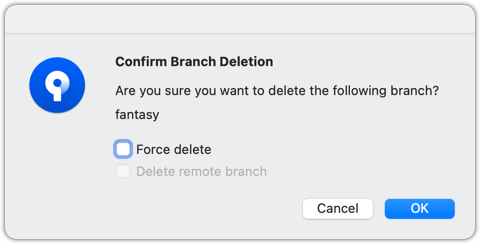
Observe that all commits remain. The only thing missing is the textbooks ref.
2 Make a copy of the SHA of the tip of the (unmerged) fantasy branch.
3 Delete the fantasy branch.
Attempt to delete the branch. It should fail, as shown below:
git branch -d fantasy
error: the branch 'fantasy' is not fully merged
hint: If you are sure you want to delete it, run 'git branch -D fantasy'
As the error message suggests, you can replace -d with -D to force the deletion.
git branch -D fantasy
Now, check the revision graph:
git log --oneline --decorate --graph --all
* 443132a (HEAD -> main) Merge branch textbooks
|\
| * 4969163 Add textbooks.txt
|/
* 7f28f0e Add horror.txt
Attempt to delete the branch as you did before. It will fail because the branch has unmerged commits.
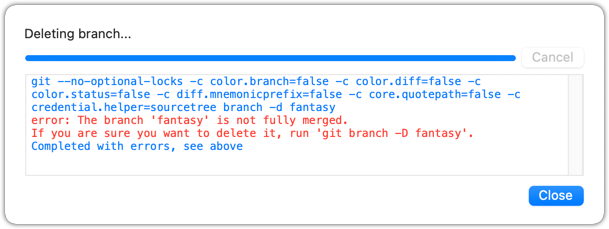
Try again, but this time select the Force delete option, which will force Git to delete the unmerged branch:
Observe how the branch ref fantasy is gone, and the branch's unmerged commits are no longer visible in the commit graph (e.g., if you run git log --all).
4 Attempt to view the 'unreachable' commit whose SHA you noted in step 2.
For example, git show 32b34fb (use the SHA you copied earlier)
Observe how the commit still exists, and you are still able to inspect it using its commit ID (for now).
done!
This is a good time to attempt exercises that combine knowledge from multiple branch-management lessons in this tour: