The next step is to create a local copy of the remote repo by cloning it.
You can clone a repository to create a local copy on your computer. A normal clone downloads the repository history and populates the working directory with the files from the latest commit of the default branch, giving you a local working copy.
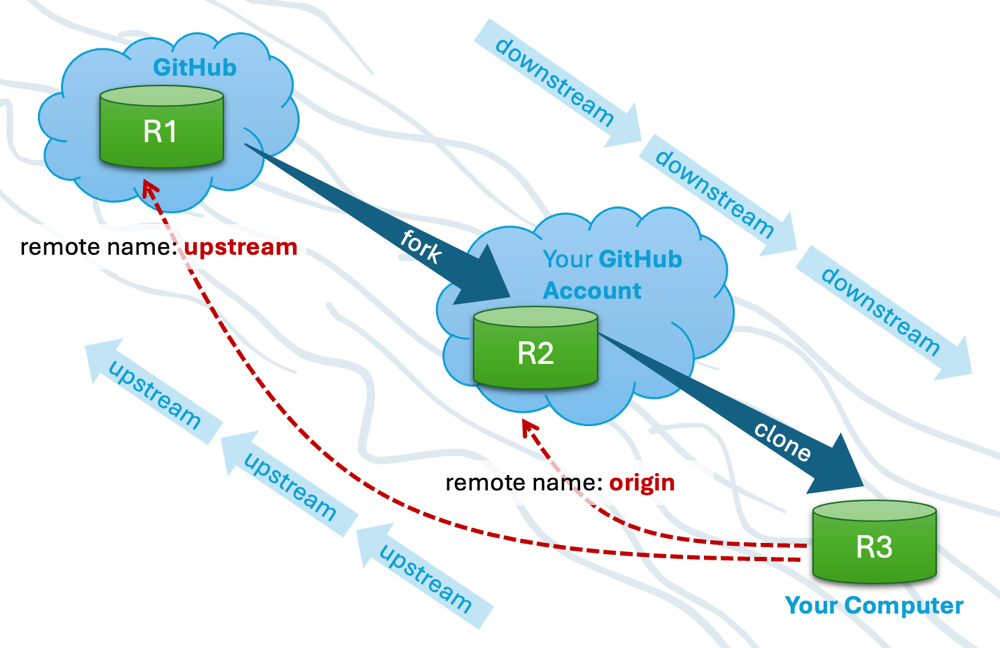
Cloning a repo automatically creates a remote named origin, which points to the repo you cloned from.
Conventions:
When configuring remotes for a Git repository, the following naming conventions are commonly used:
origin: The repository that you cloned from is usually given the remote nameorigin. Git sets this remote name automatically when you clone a repository (but you can change it to something else).upstream: In fork-based workflows, the repository you forked from is often added as a second remote namedupstream. This name is not created by Git automatically; it is a convention chosen by developers. Some teams use a more specific name for this, such asteam-repo.
Separately from remote names, the term 'upstream' is also used informally to describe the relationship between an original repository and its duplicates. When one repository is created by duplicating another (for example, by forking or cloning), the original repository is said to be upstream of the duplicate.
Example:
- If you fork R1 to create R2, then R1 is upstream of R2.
- If you then clone R2 to create R3, both R1 and R2 are upstream of R3.
1 Clone the remote repo to your computer. For example, you can clone the samplerepo-things repo, or the fork you created from it in a previous lesson.
Note that the GitHub project page URL is different from the repo URL you need for cloning. For example:
https://github.com/git-mastery/samplerepo-things # GitHub project URL
https://github.com/git-mastery/samplerepo-things.git # the repo URL
You can use the git clone <repository-url> [directory-name] command to clone a repo.
<repository-url>: The URL of the remote repository you want to copy.[directory-name](optional): The name of the folder where you want the repository to be cloned. If you omit this, Git will create a folder with the same name as the repository.
git clone https://github.com/git-mastery/samplerepo-things.git # if using HTTPS
git clone git@github.com:git-mastery/samplerepo-things.git # if using SSH
git clone https://github.com/foo/bar.git my-bar-copy # also specifies a dir to use
For exact steps, see this GitHub document.
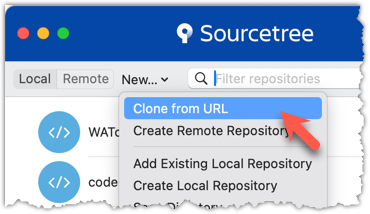
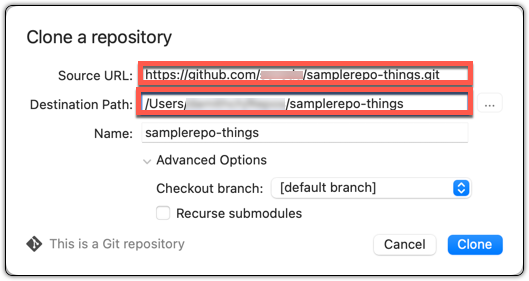
File → Clone / New ... and provide the URL of the repo and the destination directory.
File → New ... → Choose as shown below → Provide the URL of the repo and the destination directory in the next dialog.
2 Verify the clone has a remote named origin pointing to the repo you cloned from.
Use the git remote -v command that you learned earlier.
Choose the Repository → Repository Settings menu option.
done!