When the revision history gets 'messy', Git has a way to 'tidy up' the recent commits.
Git has a powerful tool called interactive rebasing, which lets you review and reorganize your recent commits. With it, you can reword commit messages, change their order, delete commits, combine several commits into one (squash), or split a commit into smaller pieces. This feature is useful for tidying up a commit history that has become messy — for example, when some commits are out of order, poorly described, or include changes that would be clearer if split up or combined.
Preparation Run the following commands to create a sample repo that we'll use for this hands-on practical:
mkdir samplerepo-sitcom
cd samplerepo-sitcom
git init -b main
echo "Aspiring actress" >> Penny.txt
git add .
git commit -m "C1: Add Penny.txt"
echo "Scientist" >> Sheldon.txt
git add .
git commit -m "C3: Add Sheldon.txt"
echo "Comic book store owner" >> Stuart.txt
git add .
git commit -m "C2: Add Stuart.txt"
echo "Engineer" >> Stuart.txt
git commit -am "X: Incorrectly update Stuart.txt"
echo "Engineer" >> Howard.txt
git add .
git commit -m "C4: Adddd Howard.txt"
Target Here are the commits that should be in the created repo, and how each commit needs to be 'tidied up'.
C4: Adddd Howard.txt-- Fix typo in the commit messageAdddd→Add.X: Incorrectly update Stuart.txt-- Drop this commit.C2: Add Stuart.txt-- Swap this commit with the one below.C3: Add Sheldon.txt-- Swap this commit with the one above.C1: Add Penny.txt-- No change required.
1 Start the interactive rebase.
To start the interactive rebase, use the git rebase -i <start-commit> command. -i stands for 'interactive'. In this case, we want to modify the last four commits (hence, HEAD~4).
git rebase -i HEAD~4
pick 97a8c4a C3: Add Sheldon.txt
pick 60bd28d C2: Add Stuart.txt
pick 8b9a36f X: Incorrectly update Stuart.txt
pick 8ab6941 C4: Adddd Howard.txt
# Rebase ee04afe..8ab6941 onto ee04afe (4 commands)
#
# Commands:
# p, pick <commit> = use commit
# r, reword <commit> = use commit, but edit the commit message
# e, edit <commit> = use commit, but stop for amending
# s, squash <commit> = use commit, but meld into previous commit
# f, fixup [-C | -c] <commit> = like "squash" but keep only the previous
# commit's log message, unless -C is used, in which case
# keep only this commit's message; -c is same as -C but
# opens the editor
# x, exec <command> = run command (the rest of the line) using shell
# b, break = stop here (continue rebase later with 'git rebase --continue')
# d, drop <commit> = remove commit
# l, label <label> = label current HEAD with a name
# t, reset <label> = reset HEAD to a label
# m, merge [-C <commit> | -c <commit>] <label> [# <oneline>]
# create a merge commit using the original merge commit's
# message (or the oneline, if no original merge commit was
# specified); use -c <commit> to reword the commit message
# u, update-ref <ref> = track a placeholder for the <ref> to be updated
# to this position in the new commits. The <ref> is
# updated at the end of the rebase
#
# These lines can be re-ordered; they are executed from top to bottom.
#
# If you remove a line here THAT COMMIT WILL BE LOST.
#
# However, if you remove everything, the rebase will be aborted.
#
The command opens your text editor, which shows content similar to the example above. It has two parts:
- At the top, the list of commits and the action to take on each, oldest commit first, with the action
pickindicated by default (pickmeans 'use this commit in the result') for each. - At the bottom, instructions on how to edit those lines.
2 Edit the commit list to specify the rebase actions, as follows:
pick 60bd28d C2: Add Stuart.txt
pick 97a8c4a C3: Add Sheldon.txt
drop 8b9a36f X: Incorrectly update Stuart.txt
reword 8ab6941 C4: Adddd Howard.txt
3 Once you save your edits and exit the text editor, Git will perform the rebase based on the actions you specified, from top to bottom.
At certain points, Git will pause the rebase and ask for your input. In this case, it will ask you to specify the new commit message when it processes the following line.
reword 8ab6941 C4: Adddd Howard.txt
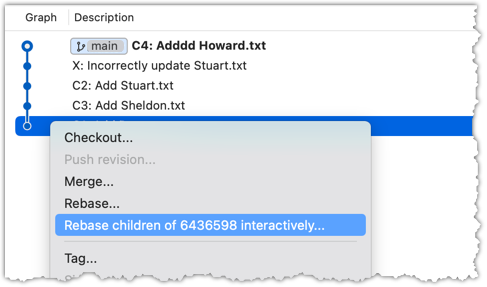
To enter interactive rebase mode, right-click the parent commit of the earliest commit you want to reorganize (in this case, it is C1: Add Penny.txt) and choose Rebase children of <SHA> interactively...
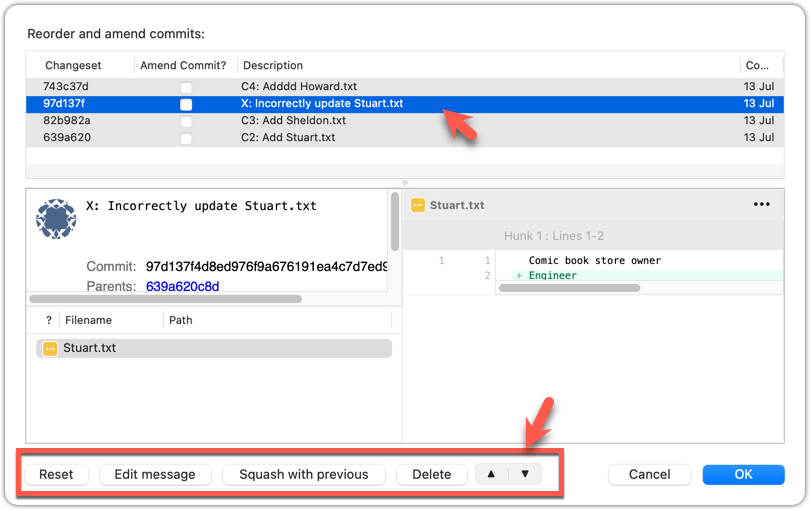
2 To indicate which action to perform on each commit, select the commit in the list and click the button for the action you want to apply to it:
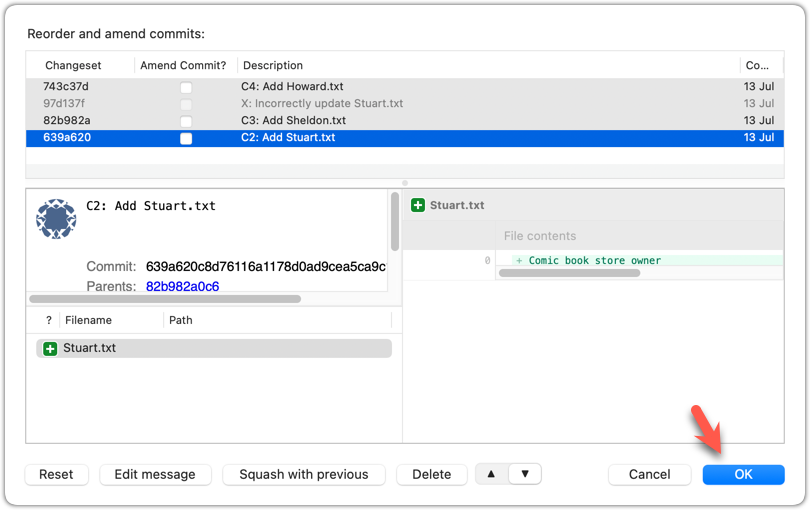
3 To execute the rebase, after indicating the action for all commits (the dialog will look like the following), click OK.
The final result should look like this, with the commits 'tidied up' exactly as intended:
* 727d877 C4: Add Howard.txt
* 764fc29 C3: Add Sheldon.txt
* 08a965a C2: Add Stuart.txt
* 6436598 C1: Add Penny.txt
done!
PRO-TIP: Combining commits with squash
Instead of dropping a commit, you can meld it into the commit right before it in the list, using squash (or s). For example, if X: Incorrectly update Stuart.txt had been an unfinished part of C2: Add Stuart.txt rather than a mistake to discard, you could squash it into C2 like this:
pick 60bd28d C2: Add Stuart.txt
squash 8b9a36f X: Incorrectly update Stuart.txt
pick 97a8c4a C3: Add Sheldon.txt
reword 8ab6941 C4: Adddd Howard.txt
Git will then open the editor so you can combine the two commit messages. X will disappear as a separate commit, with its changes merged into C2.
Splitting a commit into smaller ones is also possible, though it takes a few more steps: mark the commit with edit instead of pick, then when the rebase pauses on it, undo just that commit with git reset HEAD~1 (this unstages its changes but keeps them in the working directory), and re-stage and commit the changes in smaller pieces before continuing the rebase with git rebase --continue.
Rebasing rewrites history. Do not rebase commits you have already shared with others.
DETOUR: Updating the Last Commit
Git allows you to amend the most recent commit. This is useful when you realize you need to change something, such as fixing a typo in the commit message or excluding an unintended change from the commit.
Updating the commit message
To change the commit message subject only, use the git commit --amend -m "<new commit message>" command.
git commit --amend -m "Fix bug that froze the GUI"
To change the entire commit message (not just the subject), run the git commit --amend command, which will open the text editor for you to edit the commit message. The commit will be updated when you close the text editor.
Click the Commit button in the top menu. In the commit-message area, use one of the two methods below to enter 'Amend last commit' mode.
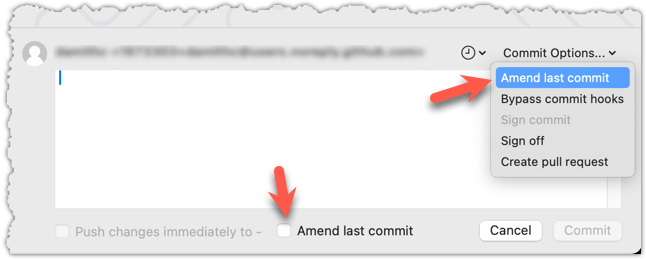
Sourcetree will populate the text box with the previous commit message. Edit it as needed, and click the Commit button to update the commit.
Updating changes in the commit
One reliable method is to perform a 'soft reset' of the last commit, update the staging area as needed, and commit again.
'Updating' a commit does not really update that commit; instead, it creates a new commit with the new data. The original commit remains and is 'left behind' in the repo, and will be garbage-collected after a while if it is not referenced by anything else.