Often, you'll need to delete a branch in a remote repo after it has served its purpose.
To delete a branch in a remote repository, you simply tell Git to remove the reference to that branch from the remote. This does not delete the branch from your local repository — it only removes it from the remote, so others won’t see it anymore. This is useful for cleaning up old or merged branches that are no longer needed on the remote.
Preparation
1 Create a local copy of the fantasy branch in your clone.
Follow instructions in Lesson T8L2. Pulling Branches from a Remote.
2 Delete the remote branch fantasy.
You can use the git push <remote> --delete <branch> command to delete a branch in a remote. This is similar to pushing changes in a branch to a remote, except the --delete switch tells Git to delete the branch instead.
git push origin --delete fantasy
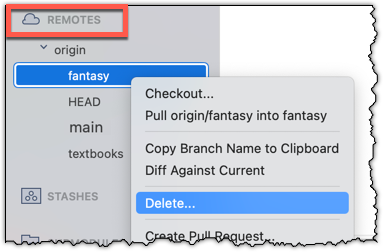
Locate the remote branch under REMOTES → origin, right-click on the branch name, and choose Delete...:
3 Verify that the branch was deleted from the remote, by going to the fork on GitHub and checking the branches page https://github.com/{YOUR_USERNAME}/gitmastery-samplerepo-books/branches
e.g., (if your username is https://github.com/[[username: JohnDoe]]/gitmastery-samplerepo-books/branches.
Also verify that the local copy has not been deleted.
4 Restore the remote branch from the local copy.
Push the local branch to the remote, while enabling the tracking option (as if pushing the branch to the remote for the first time), as covered in Lesson T8L1. Pushing Branches to a Remote.
In the above steps, we first created a local copy of the branch before deleting it in the remote repo. Doing so is optional. You can delete a remote branch without ever checking it out locally — you just need to know its name on the remote. Deleting the remote branch directly without creating a local copy is recommended if you simply want to clean up a remote branch you no longer need.
done!